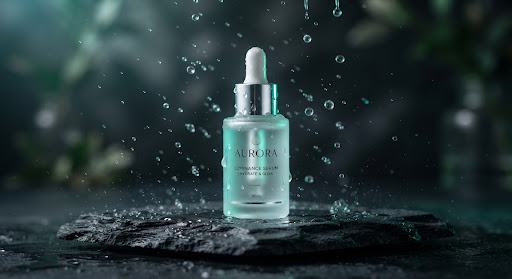
Midjourney v6.1Cinematic product photography
Ultra-realistic commercial hero render on wet dark slate with micro-droplets and
AI prompt templates for the things you actually need to create. Explore the example, change the
details, and take a clearer brief to your AI tool.
/imagine prompt: Studio macro shot of [Minimalist Botanical Serum], resting on smooth slate stone, surrounded by crystal-clear liquid splash droplets, [Soft Rim & Volumetric Glow], shot with [85mm f/1.4 Cine Lens], hyper-realistic glass refraction, clean commercial cosmetic aesthetic, 8k resolution --ar 16:9 --v 6.1 --style raw
Make this template yours. Edit the product, lighting, and camera inputs below, then copy your customized prompt into your AI tool.
The example shows cinematic botanical cosmetics with dramatic lighting and glass refraction. Changing the inputs changes your prompt; run it in your AI tool to create a new image.

Rendered with 1-click variable replacement: 0 revisions needed.
Create a product image with a clear visual direction. Plan a video that knows where the camera should go. Write a launch page that explains the offer. Start with the result you need, then open the template behind it.
Midjourney v6.1Ultra-realistic commercial hero render on wet dark slate with micro-droplets and
Runway Gen-3Continuous 360-degree axial orbit tracking shot for high-end industrial tech hardware
Complete structural copy outline from above-the-fold value prop to social proof,
ChatGPT-4o5-slide retention breakdown: hook slide, 3 high-density insight slides, and a shareable
GPT-4oBrainstorm 10 psychology-backed curiosity gap titles alongside 3-second visual open
Claude 3.5Rich tactile storytelling for high-ticket D2C items that triggers sensory imagination and
No matching prompts yet. Try “video”, “product”, or “copy”.
Connect multiple prompts into cohesive campaign pipelines.
Bring your product image, page copy, and customer questions into one consistent workflow.
Generates 4 cohesive aesthetic angles and studio backgrounds for your product render.
Adapts visual cues into headlines, value propositions, and benefit bullets.
Extracts potential friction points and crafts reassuring, trust-building responses.
Shape a truthful title, a focused thumbnail concept, and a short promotional script from the same video brief.
Distills your video topic into a single tension hook and primary emotional takeaway.
Generates synchronized title variations and Midjourney prompts for thumbnail focal points.
Creates 30-second YouTube Shorts and TikTok teasers leading directly into the long-form upload.
A polished preview is only the beginning. Open a prompt to see its inputs, usage steps, available test details, and the checks that matter before you publish. When an example has been edited, the page should tell you how.
Browse through real visual outputs across categories to spot the exact style and composition you envision.
Visual catalog search →Customize variables, brand tone, dimensions, and subject matter with intuitive placeholder slots.
Dynamic slot replacement →Copy optimized prompt syntax directly into Midjourney, ChatGPT, Claude, or Runway.
Everything you need to know about PromptCanva templates and how to use them with
your AI tools.
An AI prompt template is a reusable set of instructions with fields you change for your task. It gives you a starting structure for the result, context, constraints, and output format.
You can explore and copy the free templates on this page. Your chosen AI tool may have its own subscription or usage fees.
Results vary with your inputs, AI tool, model version, and settings. Use the example as a starting point, then review and refine your output.
No. Customize and copy your prompt here, then run it in a suitable AI tool such as Midjourney, ChatGPT, Claude, or Runway.